
Proximity Sensor Wiring Guide: PNP vs NPN, 3-Wire vs 4-Wire (With Diagrams)
In industrial automation, proximity switches are essential sensors. They detect objects without physical contact and are widely used for counting, positioning, and safety. However, for many engineers, the confusion between PNP vs NPN and 3-wire vs 4-wire configurations can lead to equipment failure or even fried PLC modules.
This guide from FSDDSK covers the basic principles and the practical wiring methods, so you can connect each sensor type correctly the first time.
I. Understanding the Basics: PNP vs NPN
Before wiring, it is crucial to understand what is a proximity switch and how its output type interacts with your controller. The core difference lies in the Output Type.
1. Sourcing vs Sinking
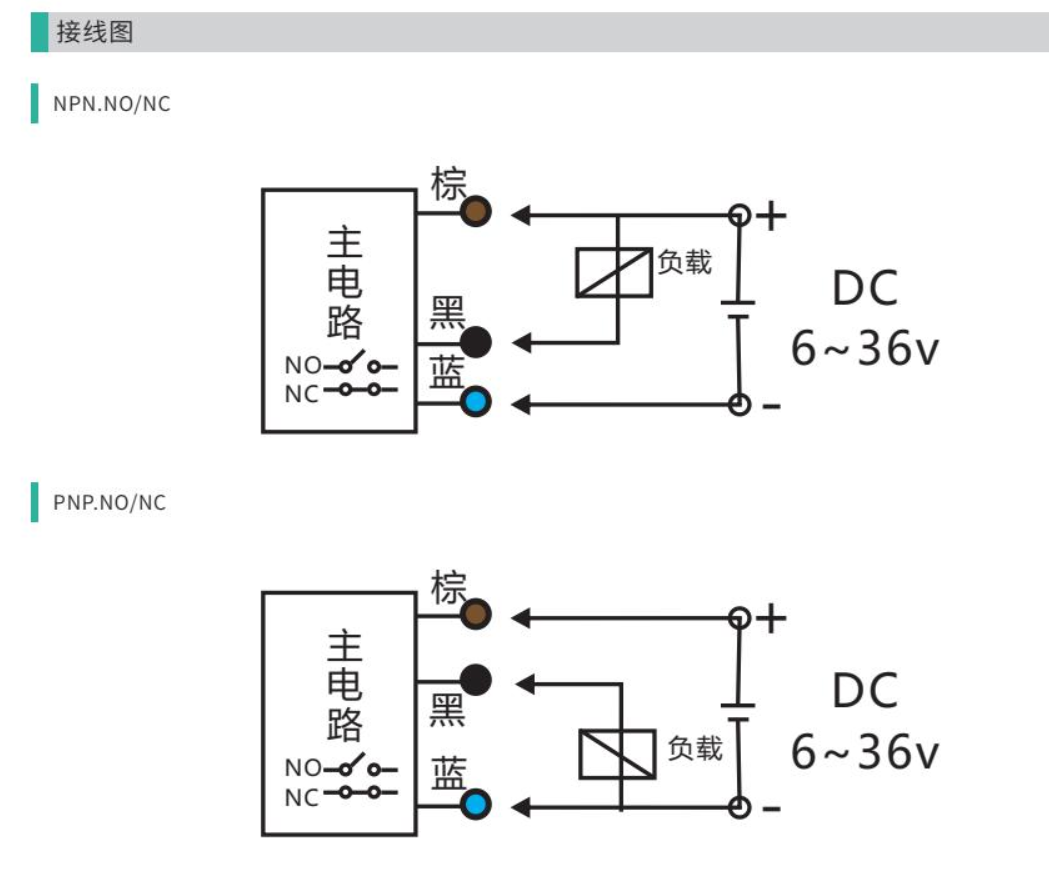
- NPN (Sinking Output): When triggered, the output (Black wire) connects to the Negative (Blue wire), outputting a Low Level signal. Current flows from the load into the sensor.
- PNP (Sourcing Output): When triggered, the output (Black wire) connects to the Positive (Brown wire), outputting a High Level signal. Current flows from the sensor into the load.
Pro Tip: Think of NPN as “Pulling Down” to 0V and PNP as “Pushing Up” to +24V.
2. Why two types?
It depends on your PLC brand. European PLCs (Siemens, Beckhoff) typically use PNP (Sourcing) inputs, while Japanese brands (Mitsubishi, Omron) often use NPN (Sinking) inputs.
II. 3-Wire Proximity Sensors: The Industry Standard
The 3-wire proximity sensors are the most common in the industry, consisting of two power lines and one signal line.
Standard Color Codes (International Standards):
- Brown (BN): Positive (+V, usually +24V DC)
- Blue (BU): Negative (0V / GND)
- Black (BK): Signal Output
III. 4-Wire Proximity Sensors: NO + NC Flexibility
Our high-performance 4-wire proximity sensors add a White (WH) wire to provide both Normally Open (NO) and Normally Closed (NC) signals simultaneously.
- Brown (BN): +V
- Blue (BU): 0V / GND
- Black (BK): Normally Open (NO) Output
- White (WH): Normally Closed (NC) Output
-.jpg)
IV. Pre-Wiring Checklist: Avoid Frying Your Sensor
Before you power up, run through this checklist from our technical team:
- Voltage Check: Most FSDDSK sensors run on 12V-24V DC. Never connect to AC unless specified.
- Polarity: Verify Brown is + and Blue is −. Reversing these is the #1 cause of sensor failure.
- PLC Compatibility: Ensure your PLC input matches the sensor (PNP to Sourcing input, NPN to Sinking input).
- Load Current: Ensure the connected relay doesn't exceed the sensor’s max output (usually 200 mA).
V. Common Troubleshooting
- Sensor LED is on, but no PLC signal: Indicates a PNP/NPN mismatch. Measure output voltage with a multimeter.
- Frequent false triggers: Check for metal interference or unstable power.
- Sensor burns out: Immediately check for reversed polarity or a short circuit.
Conclusion: Selecting the right proximity sensor wiring is crucial for system stability. For professional industrial sensors and technical support, visit www.fsddsk.com.